What Is Technical SEO: A Guide to Website Performance

Technical SEO is all about optimising the nuts and bolts of your website so search engines can find, understand, and rank your stuff. It’s the invisible foundation that makes sure all your other hard work—like writing great articles and getting backlinks—actually pays off.
Understanding Your Website’s Foundation
I like to think of a website as a house you’ve just built. On-page SEO is like the interior design—picking the right paint colours and furniture to make it a great place for visitors. Off-page SEO is your reputation on the street—the good things people say about you that build trust.
But what about the bits no one ever sees?
That’s technical SEO. It’s the solid foundation, the plumbing, and the electrics. If the foundation is dodgy or the wiring is a mess, it doesn’t matter how nice the house looks; it just won’t work properly. That’s how I see technical SEO—it’s the essential groundwork that lets your whole digital strategy stand up straight.
The Core Purpose of Technical SEO
At its heart, technical optimisation is about removing any roadblocks that stop search engines like Google from getting to and making sense of your website. It’s a crucial part of SEO that focuses on your website’s infrastructure. Here in the UK, it’s become even more important since Google brought in Core Web Vitals, which are all about measuring user experience. You can find more about the latest UK SEO trends to see why this is such a big deal now.
Without a solid technical setup, even the most amazing content can end up being invisible. The main goals I always focus on are:
- Crawlability: Making it dead simple for search engine bots to find all your important pages. For example, ensuring your menu navigation uses standard HTML links that crawlers can follow, not complex JavaScript they might struggle with.
- Indexability: Helping those bots understand your content and file it away correctly in their huge database. This could mean using a “noindex” tag on a thank-you page to prevent it from showing up in search results.
- Performance: Making sure your site is fast, secure, and works brilliantly for everyone, no matter what device they’re using.
Technical SEO isn’t a one-and-done job; it’s something you have to keep tweaking. It’s about speaking Google’s language so clearly that it has no problem recommending your site to its users.
By getting these foundational bits right, I’m setting the stage for better visibility and a much smoother experience for your visitors, which has a direct impact on your ability to rank and get results.
Helping Search Engines Find Your Content

Before your website can even think about hitting page one, search engines need two basic things from you: a good map and a clear set of directions. This is the nuts and bolts of crawlability and indexability, and it’s always the first thing I check in any technical SEO audit. If you get this wrong, your site might as well be invisible.
Think of your website as a brand-new city. For Google’s crawlers—its little automated bots—to explore everything efficiently, they need a guide. That’s where an XML sitemap comes in.
An XML sitemap is a file where I list every single important page on your website. It’s more than just a list; it’s a detailed blueprint that I hand-deliver to search engines, basically saying, “Here are all the streets and addresses in my city that are worth visiting.” This simple file ensures no page gets left behind, especially those buried deep within your site’s structure. For example, most SEO plugins for WordPress, like Yoast or Rank Math, can generate and update this file automatically.
Setting the Right Boundaries
A sitemap invites search engines in, but a robots.txt file tells them where they aren’t welcome. This is a plain text file that acts like a bouncer at the club door, giving clear instructions to the bots. For instance, I can use it to block access to things like admin login pages, internal search results, or any duplicate content that has no business being indexed.
Getting this wrong can be a total disaster. A single bad line in this file, like Disallow: /, could accidentally tell Google to ignore your entire website. I always check this file first to make sure it’s guiding bots correctly and not just shutting the door on them.
A well-configured
robots.txtfile and a comprehensive XML sitemap work together to create a perfect navigation system for search engine crawlers, ensuring they spend their limited crawl budget on your most valuable content.
Fixing Common Roadblocks
Even with a great map and clear rules, crawlers can still hit dead ends. These are usually broken links that lead to 404 error pages. When a bot follows a link to a page that doesn’t exist anymore, it hits a wall. Too many of these send a signal that your site is poorly maintained, which can definitely hurt your rankings.
A core part of my process is regularly scanning a website for these broken links and sorting them out. This usually means:
- Redirecting the old URL to a new, relevant page.
- Updating the link so it points to the right place.
- Removing the link entirely if the content is gone for good.
I once worked with an e-commerce client who’d removed a whole category of seasonal products but left hundreds of internal links pointing to the now-dead pages. It created a massive maze of 404 errors. By simply redirecting those old URLs to the main category page, we instantly improved the site’s crawlability and saw a nice little bump in the rankings. Simple fixes like these often unlock immediate potential by making your website a breeze for search engines to get around.
Optimising Your Website for People
You’d be forgiven for thinking technical SEO is all about pleasing search engine bots. But here’s the truth: it’s fundamentally about creating a brilliant experience for your actual human visitors. A fast, easy-to-use website makes people happy, and a happy user is one of the best signals you can send to Google. This is where we get into the nuts and bolts of performance, speed, and mobile-friendliness.
At the heart of this user-centric approach are Google’s Core Web Vitals. These are very specific metrics that measure the real-world experience people have on your site. Think of them as a quick health check for usability: how fast does it load? How quickly can you click on something? And does the page jump around annoyingly while you’re trying to read it?
Understanding Core Web Vitals
Getting these right is non-negotiable in my book, and it’s a massive part of any technical SEO work I do. Let’s break down what they actually measure.
- Largest Contentful Paint (LCP): Imagine walking into a room. LCP is how quickly the biggest, most important piece of furniture appears. On a news article, this is typically the main headline or the hero image.
- First Input Delay (FID): This one is all about responsiveness. It’s like pressing a doorbell and timing how long it takes to hear the chime. FID measures how quickly your website reacts when a user first tries to click a button or tap a link.
- Cumulative Layout Shift (CLS): Ever tried to tap a button on a mobile site, only for an advert to load above it and push everything down, causing you to click the wrong thing? That irritating jump is layout shift. CLS measures how visually stable your page is while it loads.
A website that scores well on Core Web Vitals is one that feels fast, responsive, and reliable to a user. This directly translates into lower bounce rates and higher engagement, which are strong positive signals for search engines.
To give you a clearer picture, I’ve put together a simple table that breaks down these metrics and what you should be aiming for.
Core Web Vitals Explained
| Metric | What It Measures | Good Performance Target |
|---|---|---|
| Largest Contentful Paint (LCP) | The time it takes for the largest image or text block to become visible. | Under 2.5 seconds |
| First Input Delay (FID) | The time from when a user first interacts (e.g., clicks a link) to when the browser responds. | Under 100 milliseconds |
| Cumulative Layout Shift (CLS) | The measurement of unexpected layout shifts that occur during the lifespan of the page. | A score of 0.1 or less |
Nailing these targets is a clear sign to both users and search engines that your site provides a solid, dependable experience.
The chart below shows how I prioritise key technical factors when I’m optimising a site for user experience.
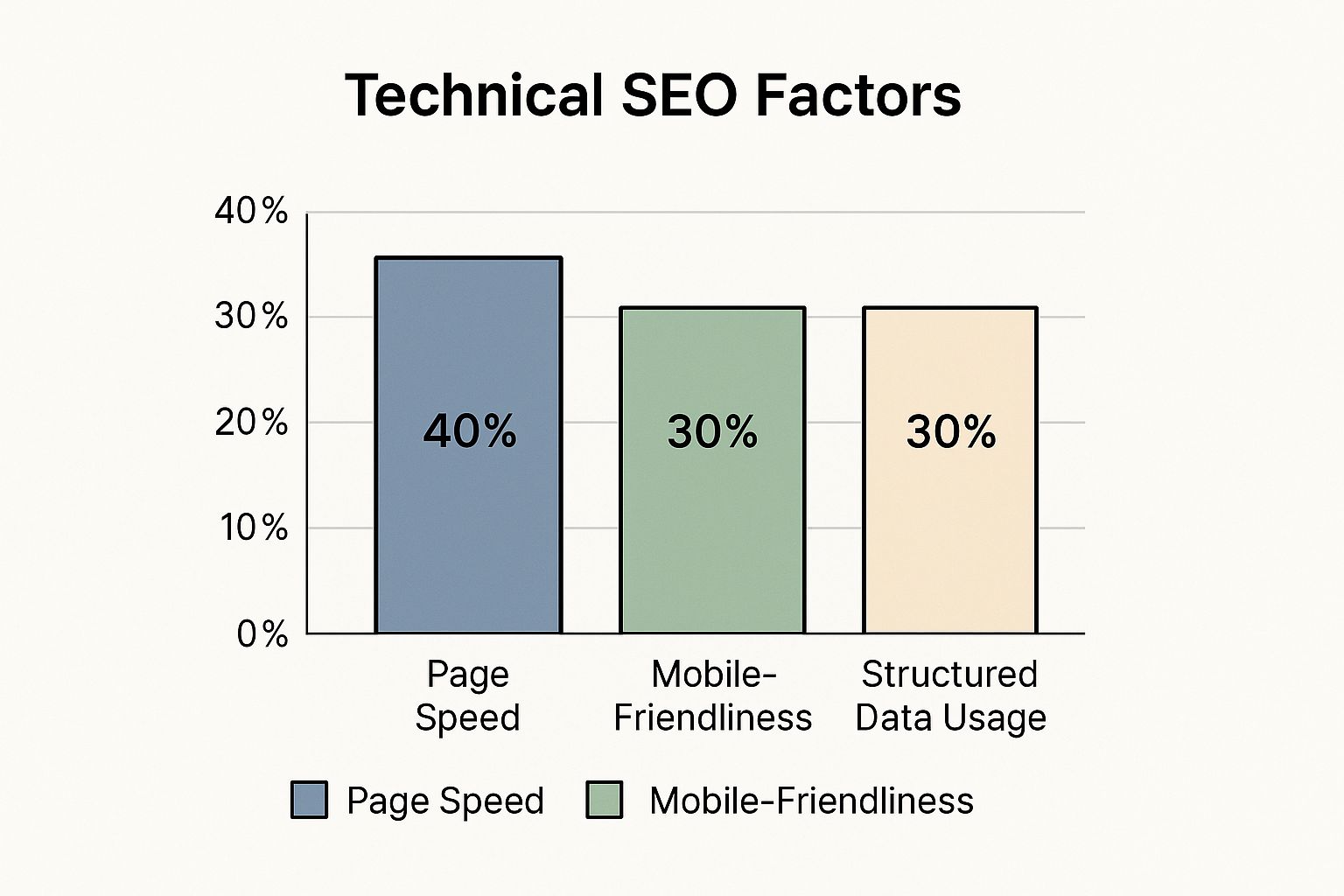
As you can see, while everything is connected, page speed really is the foundation of a positive user journey.
The Mobile-First Imperative
Here in the UK, optimising for mobile isn’t just a nice-to-have; it’s absolutely essential. A slow, clunky mobile site is a one-way ticket to losing customers. Frustrated users will simply leave and find a competitor whose site actually works properly on their phone.
This mobile-first reality has pushed UK websites to seriously refine their technical setups. To keep up, sites have had to adopt things like server-side and dynamic rendering to make sure even complex, JavaScript-heavy content gets indexed properly by Google.
This technical work is crucial when you consider that over 99,000 Google searches happen every second, and 94% of clicks go to organic results. You have to be technically sound to even compete. You can read more about these kinds of SEO trends on clickintelligence.co.uk.
To get that lightning-fast experience, I focus on practical, high-impact steps. Things like compressing image files without losing quality, minifying code to strip out unnecessary characters, and leveraging browser caching. Caching is great—it allows a user’s browser to ‘remember’ parts of your site, so it loads almost instantly on their next visit. Each of these technical tweaks directly improves the user journey, keeping people on your site and guiding them towards becoming a customer.
Building a Logical Website Blueprint

A confusing website is like a library with no signs or a proper catalogue; people and search engines just get completely lost. That’s why a huge part of technical SEO is designing a logical site architecture—a blueprint that guides everyone effortlessly to the information they need.
When I map out a website’s structure, I always aim for what’s known as a ‘flat’ architecture. This just means making sure your most important pages are only ever a few clicks away from your homepage. A shallow site structure makes the user’s journey simple and helps search engine crawlers find and give value to your key content much more efficiently.
This whole structure is held together by a smart internal linking strategy. Think of your internal links as the hallways connecting different rooms in a house. Each link passes authority—or ‘link equity’—from one page to another, telling Google which pages are the most important. A solid internal linking plan makes sure this authority spreads logically, boosting the SEO power of your entire site. This is especially important for online shops, which you can read more about in this guide to E-commerce SEO success.
Securing Your Digital Front Door
Beyond the layout, security is a non-negotiable part of your website’s blueprint. In modern SEO, having a secure site isn’t a “nice-to-have”; it’s a critical checkpoint for building trust with both your visitors and Google. The cornerstone of all this is HTTPS.
HTTPS (Hypertext Transfer Protocol Secure) is simply the secure version of the old HTTP you might be used to seeing. That extra ‘S’ at the end means that any communication between a user’s browser and your website is encrypted. Google confirmed years ago that HTTPS is a ranking signal, giving a little boost to secure sites to help protect its users.
To get your site on HTTPS, you need an SSL (Secure Sockets Layer) certificate. It’s a small data file that digitally ties a cryptographic key to your company’s details. Once it’s installed on your server, it activates that little padlock icon and the https protocol you see in your browser bar. A popular free option is Let’s Encrypt, which is supported by most modern web hosts.
An SSL certificate is more than just a bit of tech; it’s a trust signal. It shows visitors that any data they share with you, from contact forms to payment details, is safe from prying eyes.
For any UK business, especially one that handles transactions or personal data, a valid SSL certificate is an absolute must. It protects your customers, builds your credibility, and ticks a key technical SEO box that directly impacts how visible you are in search engines. From my experience, it’s a foundational piece I always check is in place and working correctly.
Translating Your Content for Search Engines

Imagine you could attach little sticky notes to your website’s content that told Google exactly what everything was. That’s pretty much what structured data, often called schema markup, does. It might sound like one of the more complicated bits of technical SEO, but the impact it has is massive.
I use this powerful ‘translator’ to spell things out for search engines. Instead of Google just seeing a jumble of text and an image, I can tell it, “Hey, this page is a recipe with these specific ingredients,” or “This is a product, it costs this much, and here are its reviews.” It removes all the guesswork.
Earning Rich Results with Schema
Getting your structured data right is your ticket to bagging those eye-catching rich snippets in the search results. You’ve definitely seen them – they’re the search listings with extra visual flair that can seriously boost how many people click on your link.
Here are a few practical things schema can do:
- Star Ratings: Show off an average review score right under your page title.
- Pricing and Availability: Display a product’s price and stock status for e-commerce sites.
- Event Details: List dates, times, and locations for your upcoming gigs or workshops.
- FAQs: Get a dropdown list of common questions and answers to show up directly in the search results.
These aren’t just cosmetic tweaks; they’re crucial for standing out. In fact, getting your structured data, page speed, and mobile experience in sync is how you win featured snippets. These can pull in a click-through rate as high as 42.9% globally. You can dig into more insights on SEO statistics from artios.io.
A Local Advantage for UK Businesses
For any UK-based business, structured data is a game-changer for local search. I make sure to implement ‘LocalBusiness’ schema to feed search engines vital info like your address, opening hours, and phone number. This gives you a direct boost in local search results and on Google Maps, making it a whole lot easier for local customers to find you.
By translating your content into a language search engines understand with 100% certainty, you’re not leaving anything to chance. This clarity helps your rankings and perfectly bridges the gap between what someone is searching for and the answer you provide.
Using schema properly is a cornerstone of modern SEO. It works together with all your other optimisation efforts to give you that competitive edge. To get the full picture, it helps to have a solid grasp of on-page SEO, which you can read about in my guide to essential on-page SEO strategies.
Your Technical SEO Audit Checklist
Right, theory is one thing, but putting it into practice is where the magic happens. I’ve put together this quick checklist to walk you through a basic technical SEO audit, using the same free tools I rely on every single day.
Crawlability and Indexability
First things first, I always check how Google is actually seeing a website. A quick site:yourdomain.co.uk search in Google is the fastest way to see which pages it has indexed. If you notice any of your key pages are missing from that list, you’ve got a problem to solve.
You’ll also want to look at your XML sitemap. This is the file I submit to Google to give it a clear map of all the important pages on a site.
Think of this file as a direct roadmap for search engines. It makes sure they don’t get lost or miss any of your valuable content while they’re crawling.
- Check
robots.txt: Make sure you aren’t accidentally telling search engines to ignore important pages. It happens more than you’d think. - Submit Your Sitemap: Head over to Google Search Console and submit your XML sitemap. This is a must-do.
- Review the Coverage Report: While you’re in Search Console, dig into the Coverage report. It will flag up crawl errors, 404s, and any pages that are blocked.
Site Performance and Security
Next up is performance. This is massive for user experience.
A fast, secure site is a non-negotiable trust signal. Visitors expect quick loading times and a safe connection, and Google rewards sites that deliver both.
- Run a Speed Test: Use Google’s PageSpeed Insights to get a read on your Core Web Vitals.
- Check Mobile-Friendliness: Google’s Mobile-Friendly Test is the perfect tool for this. No excuses for a bad mobile site these days.
- Confirm HTTPS: Double-check that every single page uses HTTPS and has a valid SSL certificate.
Architecture and On-Page Elements
Finally, I look at the site’s overall structure and how it communicates with search engines.
For UK businesses, getting local SEO right is especially important, and the technical side plays a huge part. Keeping your Google Business Profile updated with current info, for instance, is a simple but effective way to boost your local rankings.
I use a tool called Screaming Frog to spot technical issues across a whole site, but you can also complement your workflow with some of the best AI SEO tools to dominate rankings in 2025.
A Few Common Technical SEO Questions
Even after getting the basics down, a few questions always seem to pop up when it’s time to put this stuff into practice. Here are the answers to some of the most common ones I get asked.
How Often Should I Run a Technical SEO Audit?
For most websites, I’d suggest doing a full-on technical audit every 6-12 months. That’s usually a good enough window to spot any new issues before they cause real trouble.
However, if you’re running a massive, complicated site or one that changes all the time (like a big e-commerce shop), a quarterly check-in is a much smarter move. It helps you stop small hiccups from turning into major performance headaches.
Is Technical SEO a One-Time Fix?
Not a chance. It’s a continuous job. Search engine algorithms are always being tweaked, new web tech comes along, and your own site will naturally evolve.
You’ve got to keep on top of it to make sure your site stays optimised, secure, and in the game. Think of it less like buying a car and more like getting it serviced regularly.
Can I Do Technical SEO Myself?
Absolutely. You can definitely get to grips with the basics yourself. Fantastic free tools like Google Search Console and PageSpeed Insights are out there for a reason, and the checklist in this guide is a solid place to start.
But when you get into the weeds with things like a tricky site migration, international SEO, or a deep-rooted speed issue, you’ll probably need a specialist. It’s easy to make things worse if you don’t know exactly what you’re doing.
The complexity of it all has led to a massive demand for these skills. Interest in SEO courses shot up by over 500% between 2016 and early 2022, with people looking to get good at website audits, fixing crawl errors, and nailing Core Web Vitals. You can read more about that trend on Artios.io.
At Mersudin Forbes Digital, I help businesses cut through the confusion and tackle these technical challenges head-on, making sure your website is built on a solid foundation for long-term success. Find out more at https://mersudinforbes.com.