What Is Keyword Cannibalization and How to Fix It

Ever heard of keyword cannibalisation? It happens when multiple pages on your own website are all trying to rank for the same search term. I like to think of it as entering two of your own runners in the same race; they just end up splitting the effort, and neither has a real shot at winning. Your web pages do the same thing, leaving Google confused about which one it should show.
Understanding Keyword Cannibalisation
At its heart, keyword cannibalisation is a sneaky but common problem where your own content starts working against you. Whenever I create a new piece of content, the goal is always to build clear authority on that topic. But if I get sloppy and create several articles all targeting the same or very similar keywords, I’m accidentally creating a mess for search engines.
It’s a bigger problem than you might think. Instead of having one powerhouse page that pools all its ranking strength, you end up with several weaker ones. Each page struggles to climb the rankings because they’re splitting crucial SEO signals, like:
- Backlinks: Other websites might link to different competing pages, which dilutes the authority that should have been channelled into a single URL.
- Click-Through Rate (CTR): When people see multiple, similar-looking results from your website in the search results, they often get confused and might not click on any of them.
- Content Authority: Google’s crawlers have a hard time figuring out which page is the main source of information, which can cause your rankings to jump all over the place.
The Real-World Impact on Your SEO
Let’s imagine you’re a photographer and you’ve written two blog posts. The first is called “Best Wedding Venues in Manchester,” and the second is “Top Manchester Locations for Wedding Photos.” Both of these are almost certainly going after the same search terms.
Because of this, Google might rank one page on page two and the other on page three. If you had just combined them into a single, ultimate guide, that one page would have had a much better chance of hitting page one. This is a massive part of getting your content strategy right, especially when you’re first learning how to do keyword research.
Keyword cannibalisation is a significant SEO issue in the UK, where multiple pages from the same website compete for ranking on identical keywords, leading to detrimental effects on search engine visibility. According to industry analysis, websites experiencing this frequently see erratic ranking fluctuations. A good example is a report by SiteCentre which highlights how this affects UK businesses.
At a Glance Signs You Have a Cannibalisation Problem
Spotting the symptoms early can save you from months of scratching your head over poor performance. I’ve put together this quick table to help you identify the common signs that your pages might be treading on each other’s toes.
| Symptom | What It Looks Like | Why It Happens |
|---|---|---|
| Volatile Rankings | The URL ranking for your target keyword keeps changing in search results (e.g., page A ranks one week, page B the next). | Google is unsure which of your pages is the most relevant, so it keeps testing different ones to see what sticks. |
| Stagnant Rankings | You have multiple pages stuck on page two or three for the same keyword, and they just won’t budge. | Your authority and backlinks are split between pages, stopping any single one from building enough momentum to rank higher. |
| Wrong Page Ranks | A less relevant or lower-converting page is outranking your main, more detailed page for an important keyword. | The “wrong” page might have accidentally picked up more authority or better internal links over time, confusing the signals. |
If any of these look familiar, don’t panic. It’s a fixable problem, and just knowing what to look for is half the battle won.
How Keyword Cannibalisation Harms Your SEO Performance
Right, so you know what keyword cannibalisation is. Now let’s get into the real damage it can cause. I’ve seen it firsthand—this isn’t just some minor technical hiccup. It’s something that actively works against your SEO and can seriously hold your website back from its true ranking potential. It can quietly sabotage an otherwise brilliant content strategy.
Essentially, when you’ve got several pages all fighting for the same keyword, you’re putting Google in a tough spot. It has to try and figure out which page is the most relevant, and that confusion is where the problems start.

Diluted Page Authority and Backlinks
Backlinks are a massive deal for SEO. They’re like votes of confidence from other reputable sites. When another site links to your content, it passes on “link equity,” which gives your page’s authority a nice boost. Keyword cannibalisation throws a spanner in the works here.
Imagine you write two different blog posts about “how to choose a mountain bike.” One post picks up three backlinks, and the other gets four. Instead of having one really strong page with seven backlinks, you have two weaker ones. The authority is split, and neither page gathers enough clout to rank properly.
“Instead of one strong page getting all the backlinks, multiple weaker ones split the attention. If many pages discuss a similar topic, other sites may link to them inconsistently. As a result, no one page accumulates strong authority.” – Edwin Toonen, Yoast.
This dilution spreads your most valuable SEO asset way too thin. It makes it much harder for any of your competing pages to even sniff the first page of the search results.
Confusing Signals for Search Engines
Search engines like Google are constantly trying to understand your website’s structure and what each page is about. When you serve up multiple pages all targeting the same search query, you’re sending mixed signals. You’re making it hard for Google to know which one is your definitive resource on the topic.
For example, what if one page has slightly better content, but another has more internal links pointing to it? Google’s crawlers get stuck trying to decide which one to prioritise. This usually leads to a couple of things:
- Unstable Rankings: You might see one URL ranking for your keyword one week, then a completely different one the next. This bouncing around is a classic sign that Google is confused about which page is the best fit.
- Ranking the Wrong Page: Often, a less important or lower-converting page ends up outranking your main “money page.” This happens all the time when the signals are muddled.
Ultimately, this confusion can result in both pages ranking lower than a single, focused page ever would have.
Wasted Crawl Budget
Every website gets a “crawl budget”—basically, the amount of time and resources Google will spend crawling and indexing its pages. For bigger sites, particularly in e-commerce, this budget is precious.
When you have lots of redundant pages going after the same keyword, you’re making Googlebot waste its time crawling content that doesn’t offer much unique value. Those resources could have been spent finding and indexing your new, important pages instead.
This might not be a huge issue for a small blog with a few dozen pages, but for a site with thousands of URLs, a wasted crawl budget can really slow down how quickly your fresh content gets indexed. Cleaning up cannibalisation issues is just good housekeeping. It makes sure search engines are focused on the pages that actually matter.
Uncovering the Common Causes of Cannibalisation
Keyword cannibalisation rarely just happens by accident. It’s almost always a symptom of a disconnected content strategy or, frankly, a lack of basic site planning. In all my time auditing UK websites, especially big e-commerce stores or blogs churning out content, the same culprits pop up again and again.
It usually starts with good intentions. An enthusiastic team creates lots of content, focusing on volume over a cohesive strategy. But without a central plan, you inevitably create internal competition. Different people or teams create content without checking what’s already on the site, and overlap is pretty much guaranteed. As the site grows, pages start stepping on each other’s toes.
Creating Multiple Posts on Similar Topics
This is the biggest offender I see, especially on blogs. A team might write a great post on “best running shoes for beginners.” Six months later, someone else publishes another one called “how to choose your first running shoes.”
Sure, the titles are different, but the search intent is identical.
Google is more than smart enough to see that someone searching for either phrase is looking for the same answer. It’s then forced to pick between your two articles, which splits your authority and stops either one from becoming the definitive, top-ranking resource it could be.
Poorly Structured E-commerce Sites
E-commerce sites are a minefield for cannibalisation. With their complex structures and thousands of product and category pages, it’s incredibly easy to get things wrong. A classic example I run into is a fashion retailer with separate category pages for “summer dresses” and “sundresses.”
While you might see subtle stylistic differences, to a search engine, they target the same customer need. You end up with two competing pages when you could have had a single, much stronger one. This gets even worse with product variations, where every colour or size gets its own URL, causing massive confusion for search engines if you don’t use canonical tags correctly.
The core problem is that multiple pages are optimised for the same commercial intent, diluting the ranking potential of the most important category page and confusing the user journey.
This isn’t a new problem. UK SEO experts have been warning about this since at least 2021, noting that simply producing more and more similar content weakens a site’s overall ranking power. Analysis shows loads of UK businesses shot themselves in the foot by replicating keyword targeting across pages during periods of rapid growth, all because they lacked any centralised SEO oversight. You can see more on these UK optimisation practices from Impression’s analysis.
Lack of a Central Keyword Map
At the end of the day, most cannibalisation issues trace back to one simple thing: not having a keyword map. A keyword map is just a spreadsheet or document that assigns one primary target keyword to every important URL on your site. That’s it.
Without this single source of truth, it’s impossible to stop pages from overlapping. It’s your blueprint, ensuring every new piece of content has a unique job and isn’t fighting with pages you’ve already published. For any serious content strategy, I consider a keyword map completely non-negotiable.
Here are a few common disasters a keyword map helps you avoid:
- Topic Drift: Blog posts that start out distinct but, over time and through updates, slowly start to cover the exact same ground.
- Marketing Campaign Overlap: A shiny new landing page for a campaign goes after a keyword that your core service page is already ranking for.
- Regional Targeting Confusion: Creating separate pages for “plumbers in London” and “London plumbers” without a clear strategy on which one is the priority.
A Practical Guide to Finding Cannibalisation Issues
Figuring out if you have a keyword cannibalisation problem isn’t as scary as it sounds. You don’t need a load of expensive tools or a degree in data science. I’m going to walk you through the exact process I use to audit websites for these issues, using simple but powerful methods that anyone can use.
I’ll start with a straightforward trick using a special Google search command. After that, I’ll show you how to dig deeper with a free tool you already have: Google Search Console. This is all about giving you a solid toolkit to find those hidden cannibalisation problems and get your SEO back on track.
Start with a Simple Site Search
The quickest way to get a feel for potential cannibalisation is by using the site: search operator in Google. It’s a fantastic first step for spotting any obvious clashes between your pages.
Here’s how to do it:
- Pop open Google.
- In the search bar, type
site:yourdomain.co.uk "your target keyword" - Just swap out
yourdomain.co.ukwith your website address and"your target keyword"with the phrase you’re looking into.
For example, if I was checking my own site for the keyword “e-commerce SEO tips,” I’d search for: site:mersudinforbes.com "e-commerce SEO tips".
This little command tells Google to show you every single page on your site that it thinks is relevant for that keyword. If you see a bunch of your URLs pop up in the results, you’ve probably found a cannibalisation issue. It’s a dead giveaway that Google is confused about which page is the main authority.
Leverage Google Search Console for Deeper Insights
While a site: search is great for a quick check, Google Search Console (GSC) gives you the hard data you need for a proper analysis. The Performance report is your best mate here, as it shows you exactly which search queries are sending traffic to which pages.
To get started, log in to your Google Search Console account and head over to the Performance report. This is where you can see all the keywords your site is ranking for and which pages are getting the clicks.
Here’s how you can use the Performance report to find competing pages:
- In the Performance report, click the + NEW filter button at the top.
- Choose Query from the dropdown menu.
- Type in the keyword you think is causing trouble and hit Apply.
This filters the entire report to show data for just that search term. Now, click on the PAGES tab just underneath the graph.
You’ll now see a list of every single URL on your site that has picked up impressions or clicks for that keyword.

This view instantly shows you if multiple pages are fighting for the spotlight. If you see two or more URLs getting a decent number of impressions for the same query, you’ve confirmed you have a cannibalisation problem. You’ll often find that the clicks and impressions are split between these pages, which stops any one of them from hitting its full ranking potential.
A key indicator of cannibalisation is when two of your URLs are ranking close to each other for the same term but are both stuck outside the top five positions. This is often a sign that neither page is doing its best because their authority is split.
This method gives you real proof, straight from Google. It’s not guesswork; it’s a data-driven way to see which of your pages are stepping on each other’s toes in the search results. Once you have this list of competing URLs, you’re ready to start fixing the problem. This whole process works even better when you’ve got a solid keyword strategy, which you can build out by checking some of the best AI keyword research tools available.
Actionable Strategies to Fix Keyword Cannibalisation
Okay, so you’ve found the keyword cannibalisation culprits on your site. What now? It’s time to roll up your sleeves and get fixing.
There’s no one-size-fits-all solution here; the right move depends entirely on your specific situation. Choosing the right tactic is the key to pulling your SEO authority together and getting your rankings back where they belong.
I’m going to walk you through the most effective methods I use, explaining exactly when each one is the best tool for the job. We’ll cover everything from merging weaker content into one beast of a page to smart technical fixes like redirects and canonical tags.
Merge and Consolidate Weaker Content
By far the most powerful solution, especially when you have multiple blog posts fighting each other, is to merge them into a single, authoritative “power page”.
This is my absolute go-to strategy when I find a bunch of articles that are a bit thin, outdated, or just cover the same topic from slightly different angles.
By cherry-picking the best bits from each page, you create one comprehensive resource that’s way more valuable to your readers and, crucially, to Google. This approach also pools all the backlinks and “link equity” from the old pages into one supercharged URL.
When to use this method:
- You have two or more blog posts targeting the exact same user intent (like “how to choose running shoes” and “best running shoes for beginners”).
- The pages competing against each other are individually weak, old, or don’t get much traffic.
- The content can be logically blended together to create a much better, more in-depth guide.
The image below shows the massive difference in performance between having loads of competing pages versus one single, consolidated one.
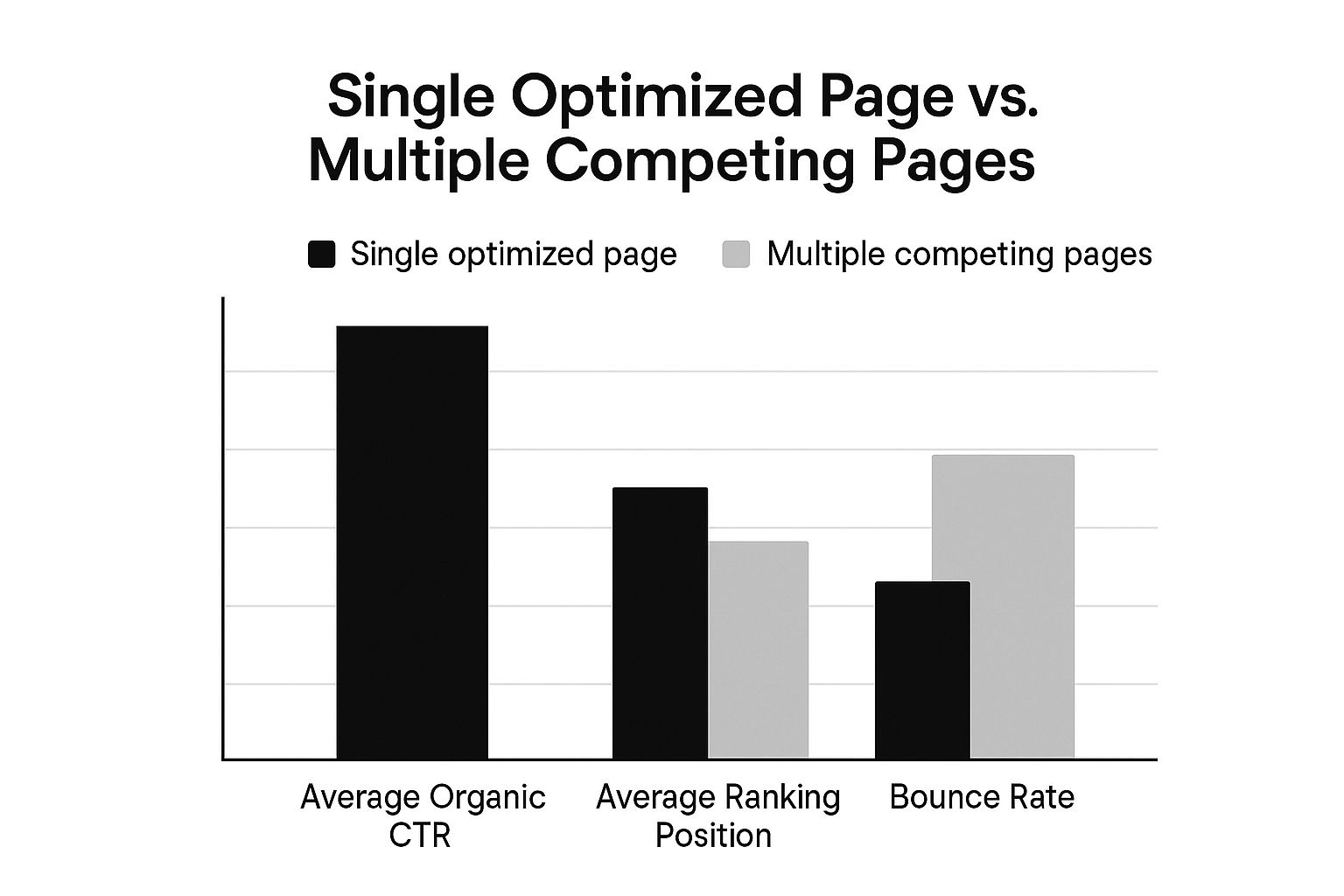
As you can see, focusing your efforts on one optimised page almost always results in a higher click-through rate, a better average ranking, and a lower bounce rate. It just works.
Use 301 Redirects for Redundant Pages
Sometimes you’ll find a competing page that doesn’t have much useful content to merge, but it has somehow managed to pick up a few backlinks or a bit of traffic. Just deleting it would be a waste of that authority.
A 301 redirect is perfect for this. It permanently points users and search engine crawlers from the weaker URL to your main, preferred page. Most importantly, it passes along the majority of the link equity, so you don’t lose the SEO value that redundant page built up.
Think of a 301 redirect like setting up a Royal Mail redirection for your website. You’re telling Google, “This page has moved for good. Please forward all its mail and authority to this new address from now on.”
It’s a clean and simple way to prune your site of unnecessary pages while holding onto their ranking power.
Apply Canonical Tags for Similar Pages
But what if you have pages that are very similar but actually need to exist as separate URLs? This is super common on e-commerce sites with product variations, like a page for the same shoe in different colours.
The answer is a canonical tag (rel="canonical").
This little snippet of HTML code in the page’s header tells search engines which version is the “master copy”. It signals that while other similar pages are out there, all ranking signals should be credited to the main, canonical URL. This sorts out duplicate content problems without you having to remove the pages themselves. The key here is that all the URLs are still live and accessible for users, which is exactly what you want for product pages.
If you’re dealing with this at scale, you can streamline these technical tasks by looking into some of the best SEO automation software.
Re-optimise or De-optimise Content
Finally, sometimes you can fix a cannibalisation issue just by changing the keyword focus of a competing page. If two pages are clashing, take a good look at them. Can one be tweaked to target a different, more specific long-tail keyword instead?
This means rewriting headings, meta descriptions, and the body copy to aim for a new, unique search query.
The other option is to “de-optimise” the less important page by removing mentions of the target keyword. This helps Google understand it’s not the main resource for that term. This is often the quickest fix if the content on the pages is distinct enough to serve different purposes.
In the UK, internal SEO audits show that between 40% and 50% of medium-to-large business websites suffer from some form of keyword cannibalisation. Fixing these issues through consolidation and restructuring can help recover 15% to 35% in lost search placements.
Choosing Your Cannibalisation Fix A Comparison of Methods
Deciding on the right fix can feel tricky, so I’ve put together this simple table to help you compare the main strategies at a glance. It breaks down when to use each method and what kind of impact you can expect.
| Method | Best Use Case | SEO Impact |
|---|---|---|
| Merge & Consolidate | Multiple weak pages targeting the same intent that can be combined into one stronger resource. | High. Consolidates link equity and creates a single authoritative page, often leading to significant ranking boosts. |
| 301 Redirect | One page is clearly superior, and the other has little unique value but has some backlinks or traffic. | High. Preserves link equity from the weaker page and funnels all authority to the primary URL. |
| Canonical Tag | Pages with very similar content must remain live (e.g., e-commerce product variations). | Medium. Prevents duplicate content penalties and consolidates ranking signals without removing pages, clarifying your preferred URL to Google. |
| Re-optimise/De-optimise | Pages have distinct potential but are accidentally competing. One can be shifted to a new keyword focus. | Medium. Resolves the conflict by creating unique targets for each page, allowing both to rank for different terms. |
Ultimately, the goal is to make it crystal clear to Google which page is the most relevant for a specific query. Use this table as your guide to pick the approach that makes the most sense for your content and your goals.
Building a Cannibalisation-Proof Content Strategy
So far, I’ve walked you through what keyword cannibalisation is, how to spot it, and how to sort it out. While all of that is great for fixing damage that’s already been done, the real win is stopping it from happening in the first place.
The goal is to get ahead of the problem. Instead of constantly reacting and patching things up, you want a content strategy that’s smart from the start. This isn’t about a quick fix; it’s about building a solid foundation for your SEO that will last.
Proactive Keyword Mapping
The absolute cornerstone of a cannibalisation-proof strategy is proactive keyword mapping. Before I even think about writing a new article, I check my master keyword map. It’s nothing fancy, just a simple spreadsheet that gives every important page on my site its own primary keyword.
This spreadsheet is my single source of truth. It makes sure every new blog post or service page has a unique job to do and doesn’t end up stepping on the toes of something I’ve already published. It’s the best way to avoid creating several articles that all chase the same search intent.
“Giving each page a clear, unique focus prevents internal competition and helps search engines understand which page to rank for a given query.” – Edwin Toonen, Yoast
Regular Content Audits and a Clear Purpose
To keep everything in check, I undertake a full content audit at least twice a year. This is where I go through everything I’ve published to find any accidental overlaps that might have snuck in and identify pages that just don’t have a clear purpose anymore.
Every single page on your site needs a specific job. You should be able to answer these questions for each one:
- What exact question does this page answer?
- What is the one main keyword it’s meant to rank for?
- Does it do the same job as another page on the site?
When you make sure every piece of content has a unique role, you create a clean, efficient site structure. Google loves that, and it’s what sets you up for proper, long-term growth in the search rankings.
Frequently Asked Questions
After getting to grips with keyword cannibalisation, from spotting it to fixing it, you might still have a few questions rattling around. That’s perfectly normal. I’ve pulled together the most common questions I get to help clear things up and give you that extra bit of confidence.
Can a Website Ever Rank with Two Pages for the Same Keyword?
It’s rare, but yes, it can happen. You might see a site with massive authority grab two spots on page one for the same search. This usually only happens when Google’s algorithm sees both pages as distinct but equally good answers for slightly different user intents.
However, I would never make this a goal. For every one time it works out, there are thousands of times it backfires, causing both pages to rank poorly. It’s a much safer bet to focus all your authority and content on a single, definitive page for each main keyword. As the experts at Yoast point out, this consolidation stops you from confusing search engines and gives your rankings a real boost.
How Often Should I Check for Keyword Cannibalisation Issues?
There’s no magic number here, but I’m a fan of being proactive. If you have a smaller website or a new blog, a quarterly check-up (every 3 months) is a great place to start. It gives you enough time to get new content published and see how it settles into the rankings before you go digging for problems.
For bigger, more active websites—like e-commerce stores or blogs publishing daily—a monthly check makes a lot more sense. The more content you’re pumping out, the higher the risk of accidentally stepping on your own toes. Making a quick cannibalisation check part of your monthly SEO reporting is a fantastic habit to get into.
My advice is to perform a quick
site:yourdomain.co.uk "keyword"search whenever you plan to target a new keyword. This simple five-second check can prevent a problem before it even begins.
Is It Always Bad to Have Pages Targeting Similar Keywords?
Not always, but you need a very clear strategy. It all comes down to search intent. If two pages target similar keywords but serve completely different needs, they can live together just fine. For instance, you could have one page targeting “what is a 301 redirect” (informational intent) and another targeting “301 redirect services” (commercial intent).
Even though the topic is the same, Google gets that someone looking for information has a different goal than someone ready to hire a service. The trouble starts when multiple pages target similar keywords with the exact same intent. That’s when you force them to compete, which just dilutes their power and hurts your performance.
At Mersudin Forbes Digital, I focus on giving clear, actionable SEO advice that gets real results. If you want to grow your online presence with strategies that actually work, check out the resources and insights at https://mersudinforbes.com.