Shopify SEO Optimisation: A UK E-commerce Guide
Getting your Shopify SEO optimisation right is what turns your online shop from just another URL into a real sales machine, one that pulls in qualified traffic without you having to lift a finger. It’s all about making sure your store pops up high on Google, putting your products right in front of UK customers who are already looking to buy. Just relying on Shopify’s out-of-the-box settings won’t cut it.
Why Shopify SEO Is Crucial for UK Stores
If you’re running a store in the United Kingdom, you know it’s a crowded market. The great news is that Shopify gives you a brilliant starting point, but getting found by the right people needs a proper strategy. This is where a sharp focus on SEO comes in, taking you beyond paid ads to build something that lasts.
The heart of any good ecommerce SEO strategy is making your store dead simple for both customers and search engines to figure out. When I undertake a new project, I always come back to three core pillars that have to work together.
The Three Pillars of Shopify SEO
- On-Page SEO: This is everything your visitors actually see. It’s about optimising your product titles, writing descriptions that actually sell, and using the right keywords so Google knows exactly what you’re offering.
- Technical SEO: This is all the “under-the-bonnet” stuff. I’m talking about site speed, how well it works on mobile, and having a clean site structure. It’s about making sure search engines can crawl and index your pages without hitting any roadblocks.
- Content & Authority SEO: This is where you build trust. It involves creating genuinely useful content (like blog posts) and earning links from other credible websites. This pillar shows Google that your store is a voice of authority in its niche.
Shopify is massive in the UK e-commerce scene, powering thousands of stores. That level of popularity means that while the platform itself is fantastic, you need more than the basics to stand out. According to research from BuiltWith, there are over 100,000 live Shopify stores in the United Kingdom alone. You need a rock-solid SEO plan to capture your share of that market.
My goal is always to give you the ‘why’ behind every step. When you understand the logic, you’re not just ticking boxes on a checklist; you’re building a smart strategy that will actually grow your business.
Optimising Your Product and Collection Pages
This screenshot from Shopify’s help centre shows the “Search engine listing preview” section. This is your command centre for manually editing page titles, meta descriptions, and URL handles. Getting comfortable here is a non-negotiable part of solid Shopify SEO optimisation.
Now I’m getting into the real money-makers: your product and collection pages. Honestly, these pages are the lifeblood of any e-commerce site. When I undertake a Shopify SEO optimisation project, this is where I sink a massive amount of my initial effort. Get these right, and you attract customers who are already pulling out their wallets.
Crafting Compelling Product Titles
Your product title, which is also your H1 tag, is probably the most crucial on-page SEO factor. It has to be crystal clear for both Google and your customers. I see far too many shops get clever with product names that, while creative, nobody is actually searching for.
A simple but effective formula for product titles often includes:
- Primary Keyword: What is the actual product? (e.g., “Organic Cotton T-Shirt”)
- Key Feature or Benefit: What’s special about it? (e.g., “Breathable”)
- Brand Name: Always reinforce who you are. (e.g., “by YourBrand”)
For a practical example, instead of a vague name like “The Wanderer Tee,” I’d steer a client towards something like: “The Wanderer | Men’s Organic Cotton T-Shirt | YourBrand”. This version hits a high-intent keyword but still keeps the original, branded product name.
Writing Meta Descriptions That Earn Clicks
Think of your meta description as your 160-character sales pitch on Google. It’s not a direct ranking factor, but it has a huge influence on your click-through rate (CTR). A better CTR tells Google your page is a good match, which can definitely help your rankings indirectly.
When I write meta descriptions, I always focus on these three things:
- Include the main keyword to show immediate relevance.
- Highlight a unique selling proposition (USP). Think “Free UK Delivery” or “Handmade in London.”
- End with a clear call-to-action (CTA) like “Shop Now” or “Discover the Collection.”
Your meta description is the window display for your online shop. Its only job is to get people to come inside. Make it compelling, clear, and focus on what the searcher wants, not just a string of keywords.
A poor meta description might be: “Red leather dog collar. High-quality leather dog collar for all dog breeds. Buy dog collars here.”
A much better, more persuasive version I would write is: “Discover our handmade red leather dog collar. Crafted in the UK from supple, durable leather for ultimate comfort. Free delivery. Shop the collection today!” See the difference?
Optimising Product Descriptions for Sales and SEO
Your product descriptions have to pull double duty: convince a human to buy and convince a search engine to rank the page. This is where I see a classic mistake: stores just copy-pasting manufacturer descriptions. This is a fast track to duplicate content issues. Always, always write unique copy.
I structure my product descriptions to be super scannable. I use short paragraphs, bullet points for key features, and bold text for the main benefits. I weave in your primary and secondary keywords, but make it sound natural. For example, if you sell a “waterproof hiking jacket,” you should also mention terms people might search for, like “all-weather coat,” “rain jacket,” or “trekking outerwear.”
To make sure you’re hitting all the right notes, a good e-commerce SEO checklist can be a lifesaver for covering all the crucial on-page details.
The Critical Role of Image Optimisation
E-commerce is a visual game, but search engines can’t see your images. They read the text you give them. Skipping image SEO is a really common mistake that costs stores a ton of potential traffic from Google Images.
I live by two simple rules for every single image I upload:
- Descriptive File Names: Before you even upload, change that file name from
IMG_8472.jpgto something that makes sense, likemens-brown-leather-chelsea-boots.jpg. Always use hyphens to separate the words. - Descriptive Alt Text: Alt text (alternative text) is there to describe the image for visually impaired users and search engines. Be specific. Instead of “boots,” I’d write “A pair of men’s dark brown leather Chelsea boots on a white background.” It’s a small step that makes a big difference for accessibility and your chances of ranking in image search.
Structuring URLs for Clarity
Last but not least, let’s talk URLs. Shopify makes this really easy to edit, and a clean URL helps everyone—users and search engines—understand what the page is about in a split second.
A default Shopify URL can look a bit messy:
yourstore.com/products/8927492-red-t-shirt-12
I always clean this up to be short and packed with keywords:
yourstore.com/products/mens-red-cotton-t-shirt
It seems like a minor tweak, but it all adds up to a more professional, user-friendly, and SEO-friendly site. When you apply these optimisations across every product and collection page, you’re building a seriously powerful foundation for your store’s growth.
Mastering Your Shopify Technical SEO
Technical SEO often sounds intimidating, like something you should just leave to the developers. But with Shopify, it’s much more manageable than you’d think. I always think of it as checking the engine of a car – it doesn’t matter how fantastic the paint job is if the engine is spluttering. It’s all about making sure search engines can find, crawl, and understand your shop without hitting any roadblocks.
Honestly, getting this right is fundamental. Whenever I start a Shopify SEO optimisation project, a technical audit is the very first thing I do. It lays the groundwork for all the on-page and content stuff that comes later.
This handy visual below breaks down the core on-page actions that really build on a strong technical foundation, covering everything from your product titles to meta descriptions and image alt text.
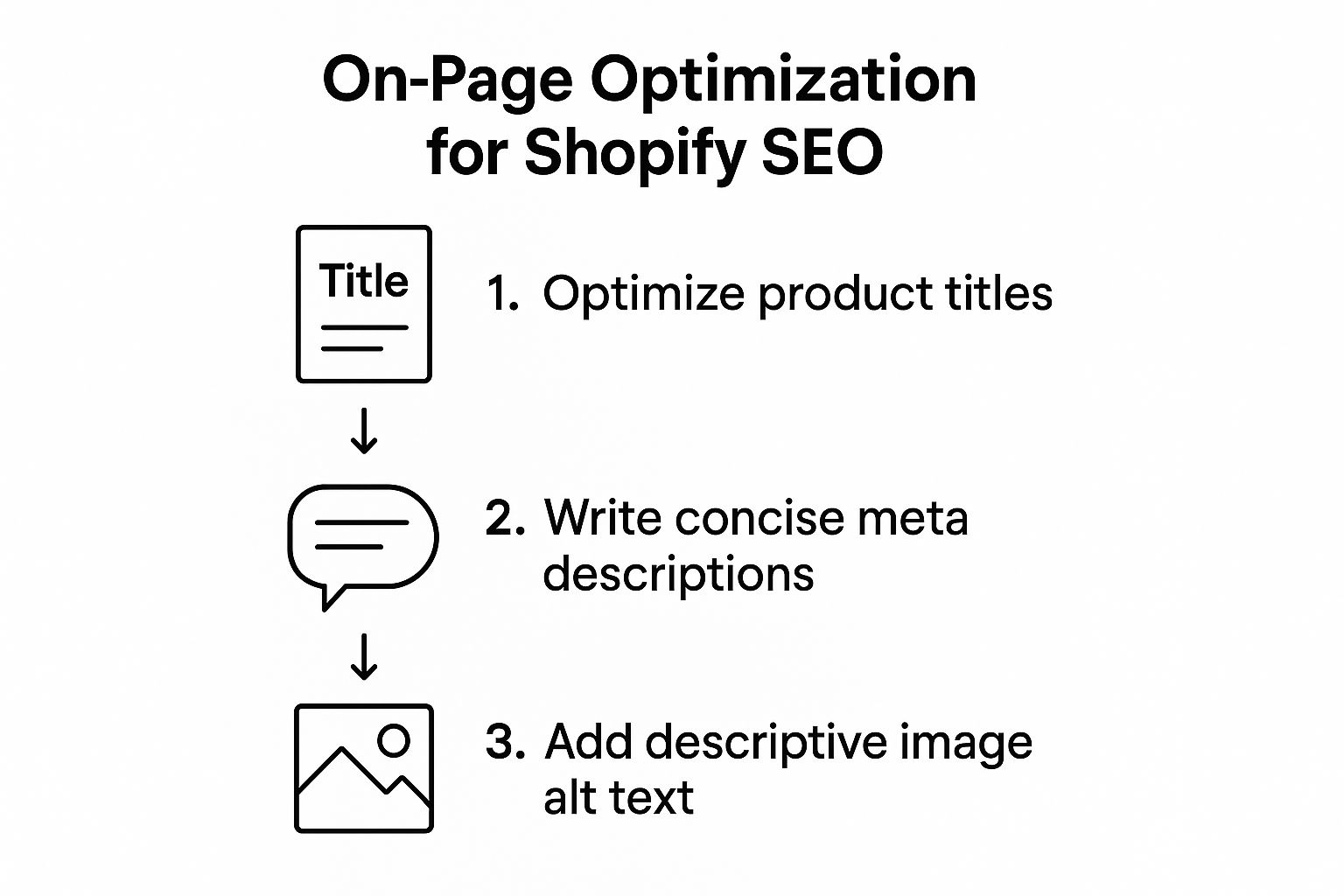
It really highlights that a winning SEO strategy is just a series of deliberate, connected steps. Each one plays a part in getting you seen.
Supercharge Your Site Speed
Site speed isn’t a small detail; it’s a huge deal. Google wants to send people to websites that offer a great experience, and let’s be real, nobody likes waiting for a page to load. A slow shop is a direct hit to your bounce rates and, ultimately, your sales.
My first move is always to run a speed test. I use Google’s PageSpeed Insights as my go-to starting point because it gives you clear, actionable advice straight from the source. The usual suspects I find on Shopify stores are:
- Massive, uncompressed images: This is the number one issue I come across. Before I upload any image, I make a habit of running it through a tool like TinyPNG. It can slash the file size without any noticeable drop in quality.
- Too many apps: Every app you install can add extra code (JavaScript and CSS) to your store, and that can really slow things down. I always tell my clients to do a regular audit of their apps and get rid of anything they aren’t actually using.
- Code-heavy themes: Some themes look stunning but are loaded with heavy code that drags down performance. When you’re picking a theme from the Shopify Theme Store, keep an eye out for ones specifically marketed as “performance-optimised”.
Build a Logical Site Architecture
A clean site structure is vital for your customers and for search engine bots. Picture walking into a huge, messy warehouse – you wouldn’t have a clue where to find anything. Your website is no different. A logical layout helps Google figure out which pages are the most important.
I’m a big believer in keeping things simple and scalable:
Homepage -> Collection Pages -> Product Pages
This kind of flat structure makes sure no product is more than three clicks away from your homepage. Not only is this a much better experience for your users, but it also helps search engines crawl your whole site without getting lost. A well-thought-out navigation menu and clear breadcrumbs are key here.
A clean site architecture does more than just help Google; it guides your customers effortlessly from discovery to purchase. The easier you make it for them to find what they want, the more likely they are to buy.
Tame Duplicate Content with Canonical Tags
Duplicate content is a real headache for Shopify store owners, especially with product variants. Say you have a t-shirt that comes in ten different colours; Shopify might create a unique URL for each one. Without the right instructions, Google could see these as ten separate, identical pages, which really waters down your ranking power.
This is where the canonical tag saves the day. It’s a little bit of code that tells search engines which version of a URL is the “main” one you want them to index. The good news? Most modern Shopify themes sort this out for you automatically, pointing all those variant URLs back to the main product page. Still, I always recommend a quick check using Google Search Console’s URL Inspection tool just to be sure.
Fixes like managing canonicals, speeding up your site, and cleaning up your site structure are what help UK stores climb to the top of Google. It’s how you capture that valuable organic traffic, which is almost always more sustainable and cheaper than paid ads. You can dig deeper into these trends in this full breakdown of Shopify’s presence in the digital market.
Clean Up Sitemaps and Robots.txt
Think of your sitemap as a map of your website that you hand-deliver to search engines. Shopify is great because it automatically generates and updates a sitemap.xml file for you (you can find it at yourstore.com/sitemap.xml). I always make sure this is submitted to Google Search Console to help Google discover all the important pages.
Your robots.txt file does the opposite. It tells search engine bots which pages they shouldn’t crawl, like your cart, admin, and checkout pages. Shopify creates a well-optimised robots.txt file right out of the box, and for most shops, you’ll never need to touch it. Honestly, trying to change it without knowing what you’re doing can lead to accidentally blocking important parts of your site from Google.
Key Technical SEO Checks for Your Shopify Store
To keep your store in top shape, it’s a good idea to run through a regular checklist. Think of it as a routine health check to catch any technical issues before they become bigger problems. Here are the essential things I always keep an eye on.
| Technical Element | What to Check | Recommended Tool/Method |
|---|---|---|
| Site Speed | Page load times, Core Web Vitals | Google PageSpeed Insights |
| Mobile-Friendliness | How your site looks and functions on mobile | Google’s Mobile-Friendly Test |
| Canonical Tags | Correct canonicals on product variants | Google Search Console URL Inspection Tool |
| Sitemap | Sitemap is generated and submitted | yourstore.com/sitemap.xml & Google Search Console |
| Robots.txt | No important pages are blocked | yourstore.com/robots.txt (usually no edits needed) |
| Broken Links | Internal and external links that lead to 404s | Ahrefs’ Free Broken Link Checker or Screaming Frog |
| SSL Certificate | Ensure your site uses HTTPS | Check for the padlock icon in your browser’s address bar |
Making these checks part of your routine—maybe once a quarter—will ensure your technical foundation remains solid, giving your other SEO efforts the best possible chance to succeed.
Building Authority with Content and Backlinks

So far, I’ve dialled in the stuff that’s already on your site – the products, the collections, and all the technical bits. Now it’s time to shift gears and look at the long game. This is what really separates the brands that stick around from the ones that don’t: building genuine authority.
This is where a solid content and backlink plan for your Shopify SEO optimisation really comes into its own.
Your product pages are great for people who are already pulling out their wallets. But what about everyone else who’s still just browsing, comparing, and figuring things out? That’s where content marketing shines. It’s your chance to answer their questions, build trust, and gently point them toward your products without a hard sell.
Creating Content That Genuinely Helps
When I talk about content, I don’t mean churning out a few bland blog posts for the sake of it. I’m talking about creating seriously useful resources that solve real problems for the people you want to sell to. Step back and think about what your ideal customer is tapping into Google, aside from your actual products.
Let’s say you sell high-end coffee beans. Your customers are probably searching for things like:
- “how to make the perfect french press coffee”
- “best coffee beans for espresso uk”
- “aeropress vs v60 which is better”
Every single one of these is a golden opportunity. By creating content that answers these questions, you stop being just a shop and start becoming an expert. You become the go-to source for anything coffee-related, building a relationship long before they’re ready to buy.
The best content doesn’t just sell; it serves. When you focus on helping your audience, you build a kind of trust that a product page alone just can’t touch. That trust is what turns one-time buyers into loyal fans.
Types of Content That Drive Traffic
Mixing up your content formats is key. It keeps things from getting stale and lets you hit different kinds of search queries. From what I’ve seen work time and again for Shopify stores, a healthy mix of these is the sweet spot:
- In-Depth Buying Guides: Think big, like “The Ultimate Guide to Choosing a Sustainable Yoga Mat.” These are absolute magnets for backlinks and help you rank for those broader, high-value search terms.
- Comparison Articles: Posts like “Dyson Airwrap vs Shark FlexStyle: A UK Review” are brilliant. They target customers who are right at the finish line, comparing their final options before they purchase.
- How-To Tutorials and Blog Posts: These are your bread and butter for proving you know your stuff. A skincare brand, for example, could write “How to Build a Morning Skincare Routine for Oily Skin.” Simple, effective, and builds authority.
The world of Shopify SEO optimisation here in the UK is changing, fast. Old-school tricks are out. Google’s AI is getting smarter, prioritising original, well-structured content. I see too many UK stores getting penalised because they just use the standard supplier product descriptions. Google’s AI-driven results see this as duplicate content and suppress it. To stay visible, you have to invest in creating your own unique content. It’s a massive shift, but it’s vital if you want to be recommended by these new AI shopping tools instead of just relying on paid ads. You can read more about how to future-proof your store for these evolving search algorithms.
Earning High-Quality Backlinks
Think of a backlink as a vote of confidence from another website. When a respected site links to your store, it’s a massive signal to Google that you’re credible. The key here is quality over quantity. Honestly, one link from a major UK newspaper like The Guardian is worth more than hundreds from dodgy, spam-filled directories.
When I run a link-building campaign, it’s all about ethical, sustainable methods. The aim is to get people linking to you because your content and your store are just that good.
My Go-To Link-Building Strategies
Digital PR
This is all about creating something newsworthy that journalists and bloggers in the UK will actually want to talk about. This could be a unique data study on your industry, a cool interactive tool, or even a charity campaign. For example, a pet supply store could create a report on the “Most Dog-Friendly Cities in the UK”, which local news outlets would love to cover. You’re creating a story that’s so interesting, publications want to write about you and link back.
Strategic Guest Posting
I often look for high-authority blogs in a client’s niche that are open to guest posts. It’s not about spamming them. It’s about pitching a genuinely useful article idea for their audience. In return, you usually get a little author bio with a link back to your Shopify store. It’s a double whammy: a powerful backlink and exposure to a whole new audience.
Collaborations and Partnerships
This is a fantastic way to earn links. I suggest teaming up with non-competing brands or UK influencers in your field. For example, a fitness apparel brand could work with a popular nutritionist on a guide like “What to Eat Before and After a Workout.” Both of you promote it and link to each other. It’s a win-win for building authority all around.
Look, these strategies aren’t quick fixes. They take consistent effort. But the authority and organic traffic you’ll build over time are what make an e-commerce business not just profitable, but resilient.
Essential Tools to Measure Your SEO Impact
You simply can’t improve what you don’t measure. It’s one thing to get your hands dirty with a Shopify SEO optimisation strategy, but knowing if any of it is actually moving the needle is where the real value is. This is where I lean on my go-to toolkit to track progress, spot problems, and make decisions based on data, not guesswork.
Flying blind is just a recipe for wasted time and money. Instead, I use a mix of free and paid platforms to get a complete 360-degree view of a store’s health. These tools show me precisely what’s driving traffic, where I’m losing customers, and which keywords are pulling in the right kind of visitors.
The Non-Negotiable Free Tools
Before you even think about spending a penny, there are two tools from Google that are completely mandatory for any Shopify store. Getting these set up properly from day one is your first real step toward measuring anything meaningful.
- Google Search Console (GSC): Think of this as your direct line to Google. It tells you how the search engine actually sees your site. I use it to see which keywords people are typing in to find a store, check average ranking positions, and find any technical hiccups that need fixing.
- Google Analytics 4 (GA4): While GSC tells you what happens before someone gets to your site, GA4 tells you what happens after they click. This is where I track organic traffic numbers, user behaviour, conversion rates, and see which pages are the real crowd-pleasers for search visitors.
Setting them up isn’t too painful. Shopify has built-in integrations that make connecting your store to both GSC and GA4 pretty straightforward. You’ll just need to verify you own the domain for GSC and pop a tracking tag into your store for GA4.
I always tell clients to think of it like this: Google Search Console is your SEO health report card from the doctor (Google), and Google Analytics is the analysis of how people behave once they’re actually inside your shop. You absolutely need both to get the full story.
Powering Up with Paid SEO Platforms
Once that foundational tracking is in place, I bring in the heavy hitters. Yes, they come with a subscription fee, but the insights you get for digging into your competition and doing proper keyword research are indispensable if you’re serious about growth.
My personal workhorses are Ahrefs and Semrush. They’re both giants in the industry for a reason, offering a massive suite of features that help me uncover some huge opportunities. For instance, I can plug in a competitor’s website and see a list of the exact keywords they rank for, which of their pages attract the most traffic, and who’s linking to them. That information is pure gold for building a better strategy.
These platforms also have fantastic keyword research tools. I can find fresh keyword ideas, get a sense of how difficult they’ll be to rank for, and really understand the intent behind the search. This data feeds directly back into the content strategy we’ve already talked about.
Shopify-Specific SEO Apps
To make life even easier, I often use SEO apps directly from the Shopify App Store. While you can do a lot of your Shopify SEO optimisation by hand, these apps can automate tedious tasks and serve up helpful tips right inside your dashboard. They’re a lifesaver for busy store owners.
These apps can help with things like:
- Image Compression: Automatically shrinking image file sizes to speed up your site.
- Schema Markup: Adding the right structured data to your pages to help you earn those eye-catching rich snippets in search results.
- Finding Broken Links: Constantly scanning your site for 404 errors that frustrate users and hurt your SEO.
A few popular options I’ve used over the years are Yoast SEO and SEO Manager. The trick is to find one that fits your budget and technical comfort level. Many are now weaving in AI features to help write meta descriptions or suggest keywords. On that note, if you’re curious about how AI is shaking things up, you can find out more about the best AI SEO tools that are becoming more common in these platforms.
At the end of the day, the goal is to build a dashboard that gives you a clear, at-a-glance view of your SEO performance. This combination of Google’s free tools, a powerful paid suite, and a handy Shopify app gives me all the data I need to prove that the SEO work is paying off.
Your Common Shopify SEO Questions Answered
I’ve been working with Shopify stores for years, and I’ve noticed the same questions about Shopify SEO optimisation crop up again and again. It’s easy to get bogged down in the details when you’re busy just trying to run your business. So, let’s clear up some of the most common queries I get.
How Long Does Shopify SEO Take to Work?
This is the big one, and the honest answer is: it takes patience. You might see Google start to pick up on your on-page changes within a few weeks, but don’t expect a sudden flood of traffic overnight. That’s just not how it works.
For real, stable growth in your organic traffic and rankings, you’re usually looking at a 3 to 6 month timeframe. I always tell my clients to think of it like building a house; the foundation work isn’t always glamorous or immediately visible, but it’s what creates a solid, lasting structure. Things like your niche’s competitiveness and how consistently you’re creating good content and building links will either speed this up or slow it down.
Are Shopify SEO Apps Really Necessary?
Strictly speaking, no. Shopify’s core platform gives you the basic tools to handle on-page SEO essentials, like editing your titles and meta descriptions. However, the right apps can be incredible time-savers.
I see them as powerful assistants. For a busy store owner, an app like Yoast SEO or SEO Manager can take tedious technical tasks off your plate. Think about things like:
- Generating structured data (schema markup) so you can get those eye-catching rich snippets in search results.
- Automatically compressing your images to keep your site speed snappy.
- Finding and flagging broken links before they start hurting your user experience.
They streamline the whole process, which frees me up to focus on the stuff that really moves the needle, like your content strategy and link building.
Is Blogging on Shopify Good for My SEO?
Absolutely. From my experience, a well-maintained blog is one of the most powerful tools in your entire Shopify SEO toolkit. Your product and collection pages target “commercial” keywords—the phrases people use when they’re ready to buy. But a blog lets you go after the “informational” keywords people use much earlier in their journey.
Each blog post is a new, unique page for Google to index and rank. It’s a fresh opportunity to attract customers who might not have found you otherwise.
By creating genuinely helpful “how-to” guides, comparison articles, or tutorials related to your products, you attract a much wider audience. You start building a reputation as an expert in your field, which builds trust and, over time, creates content that naturally earns those all-important backlinks.
How Do I Fix Duplicate Content from Product Variants?
Ah, a classic Shopify problem. When you have product variants—like a T-shirt that comes in five different colours—Shopify can create a unique URL for each one. If you don’t handle this correctly, Google might see these as five nearly identical pages, which can seriously dilute your ranking power.
The fix here is to make sure your theme is using canonical tags properly. A canonical tag is just a small piece of code that points Google to the ‘master’ version of the page you want it to index. Most modern Shopify themes handle this automatically, pointing all variant URLs back to the main product page. Still, I always advise clients to double-check this using Google Search Console’s URL Inspection tool. It’s a quick check that can save you from some major headaches later on.
Ready to stop guessing and start seeing real growth from your Shopify store? At Mersudin Forbes Digital, I provide the ROI-driven SEO strategies that turn traffic into revenue. Let’s build a plan that works. Get in touch today.