

E-commerce SEO is all about getting your online shop to show up higher in search results, like on Google. When you do it right, you get a steady flow of customers finding your products without you having to pay for every single click. It's a mix of behind-the-scenes technical tweaks, smart keyword choices, and creating the right kind of content to make your shop more visible to people who are already looking for what you sell.
I always think of it as building your shop on the busiest high street on the internet, for free.
In a massively crowded online market, getting your head around e-commerce SEO isn't just another thing to add to your to-do list—it's probably your most valuable business asset. I often compare it to picking a spot for a physical shop. You could set up on a quiet side street and hope people notice you by shouting really loudly with expensive ads. Or, you could build your store right in the city centre where thousands of shoppers are already walking past, actively looking for what you’ve got.
That prime location is exactly what great SEO gives you. It builds real, long-term value for your business and helps you move from just surviving to properly thriving. Unlike paid ads, which disappear the second you stop paying the bill, a solid SEO foundation is an asset that just keeps on giving, bringing in customers day after day.
The real magic of e-commerce SEO is how it connects you with customers who are ready to buy. These aren't just people scrolling aimlessly; they're typing phrases like “buy cork yoga mat uk” or “waterproof hiking boots for men” into Google. They have a specific need, and they're actively searching for a solution—your product.
When I undertake an e-commerce SEO strategy, the main goal is simple: make my client’s shop the most obvious and trusted answer for those searches. This directly leads to:
The value of this organic traffic becomes incredibly clear when you look at the actual numbers. Based on recent UK data, the average e-commerce brand ranks for around 1,783 keywords. This brings in an estimated 9,625 organic visits every month. To get that same amount of traffic through paid advertising, you'd be looking at a bill of roughly £11,790 every single month.
That figure alone shows the massive return you get from a well-run SEO strategy. You can read more about these e-commerce SEO statistics and what they mean for UK businesses.
In short, every visitor you get from SEO is money saved on advertising. That's cash you can put back into developing new products, improving customer service, or growing your team.
This is why I always tell people to see SEO not as a cost, but as an investment in a stable, profitable future. It's the engine that works for you 24/7, driving qualified traffic and building a resilient business that doesn't live or die by its next ad campaign.
Right, this is where the real work of e-commerce SEO kicks off. The game is all about finding the exact search terms your customers use—not just when they're browsing, but when they’ve got their wallet out, ready to buy.
Getting your head around this difference, what we call search intent, is absolutely critical.
Think of it like this: someone searching for "sustainable yoga mats" is probably just starting their research. But a person typing "buy cork yoga mat uk" is sending a massive signal that they want to make a purchase. Your job is to show up for both, but you really need to prioritise the buyers.
The good news is that search engines are the number one tool for UK shoppers hunting for products. A massive 42% of UK consumers use them as their primary way to find what they're looking for. This is why your SEO efforts have a direct line to your sales.
It’s no surprise then that nearly 39% of UK purchasers say relevant search results influenced their buying decisions, showing a crystal-clear link between good SEO and revenue. You can dig into more of these stats over at artios.io.
Before you even think about touching a keyword tool, you have to put yourself in your customer's shoes. Let's imagine I'm running a fictional online jewellery shop called "Silver Lining Jewels." What would its customers be searching for?
This whole process is fundamental to getting your SEO right. If you want a more detailed walkthrough, I'd suggest checking out our guide on what keyword research is and how you do it.
Once I have a solid grasp of intent, I can start building out a practical keyword list. I like to use a mix of powerful paid tools and some dead-simple free methods.
1. Brainstorm Seed Keywords
Start with the absolute basics. For our shop, "Silver Lining Jewels," these are the broad, obvious terms:
silver jewellerygold necklacesengagement ringsbracelets for women2. Use Free Tools to Expand
You don't need a huge budget to get started. Google itself is a goldmine. Just type your seed keywords into the search bar and pay close attention to the "People also ask" and "Related searches" sections. These are phrases real people are actually using.
For example, searching for "silver jewellery" might throw up related searches like "tarnish free silver jewellery" or "sterling silver jewellery brands uk". These are brilliant long-tail keywords that reveal specific customer needs and pain points.
3. Leverage Paid Tools for Deeper Insights
When you’re ready to get serious, tools like Ahrefs or Semrush are worth their weight in gold. They give you hard data on things like search volume (how many people search for a term each month) and keyword difficulty (how hard it is to rank for that term).
Using Ahrefs for "Silver Lining Jewels," I could quickly identify different types of keywords:
By carefully mapping these keywords to the right pages on your site—category keywords to category pages, product keywords to product pages, and those informational long-tail keywords to blog posts—you create a logical structure that both your customers and the search engines will love. This approach ensures every single page has a clear purpose and targets customers at every stage of their buying journey.

Alright, we’ve got our keywords. Now for the fun part: putting them to work. This is the core of on-page e-commerce SEO, where I turn your standard product and category pages into expert digital sales assistants. A properly optimised page doesn't just show up in search results; it actively persuades, clarifies, and nudges shoppers towards that "add to basket" button.
I like to think of each page as a dedicated salesperson. It needs to be dressed smartly (that’s your design), speak clearly (compelling copy), and be incredibly helpful (rich, useful information). When I undertake a new project, this is often where the quickest and most satisfying wins are found—turning search visibility directly into sales.
This is it—the final step before a conversion. Your product pages have to pull double duty, impressing both search engines and actual human shoppers. The trick is to weave your target keywords into key areas without sounding like a robot, all while making the content genuinely persuasive.
Let’s run through a quick ‘before-and-after’ for a made-up product page selling a "recycled cotton tote bag".
Before Optimisation:
IMG_1234.jpgYou can see the problem. It’s vague, boring, and does nothing to stand out or answer a customer's real questions.
After Optimisation:
See the difference? The optimised version targets specific keywords, shouts about its benefits, and gives customers the details they need to feel confident. It’s not about keyword stuffing; it’s about adding value at every point. Writing these descriptions by hand takes time, but the unique content gives you a massive edge. If you have a huge store, looking into some of the best AI SEO tools can help you pump out unique drafts that you can then polish up.
Product pages are for grabbing those super-specific, ready-to-buy searches. Category pages, on the other hand, are your net for catching broader interest. Someone searching for "women's summer dresses" isn't looking for one specific item just yet; they want to browse. Your category page is your chance to draw them in.
Here’s how I get these pages working harder:
By optimising category pages, you create effective hubs that guide customers seamlessly through your site. They act as signposts, improving user experience and helping search engines understand your site's structure.
Finally, I use a simple checklist to keep my on-page work consistent across any site. For both product and category pages, I always run through these five points.
On-Page SEO Checklist:
If you want more platform-specific tips, both Shopify's SEO guide and the BigCommerce SEO success guide are fantastic resources to check out.
If your on-page SEO is the salesperson and your keywords are the language they speak, then your technical SEO is the very foundation and scaffolding of your entire online shop. I always explain to clients that you can have the best products and most persuasive copy in the world, but if your shop is slow, insecure, or a maze for search engines to navigate, you’re building on shaky ground. Getting this part right is non-negotiable.
A solid technical setup makes sure that both your customers and search engine crawlers have a smooth, fast, and secure experience. It’s about making your site easy for Google to understand and rewarding for visitors to use. This isn't just about ticking boxes; it's about building a store that performs brilliantly from the ground up.
The data below shows just how much page performance impacts user behaviour on category pages.
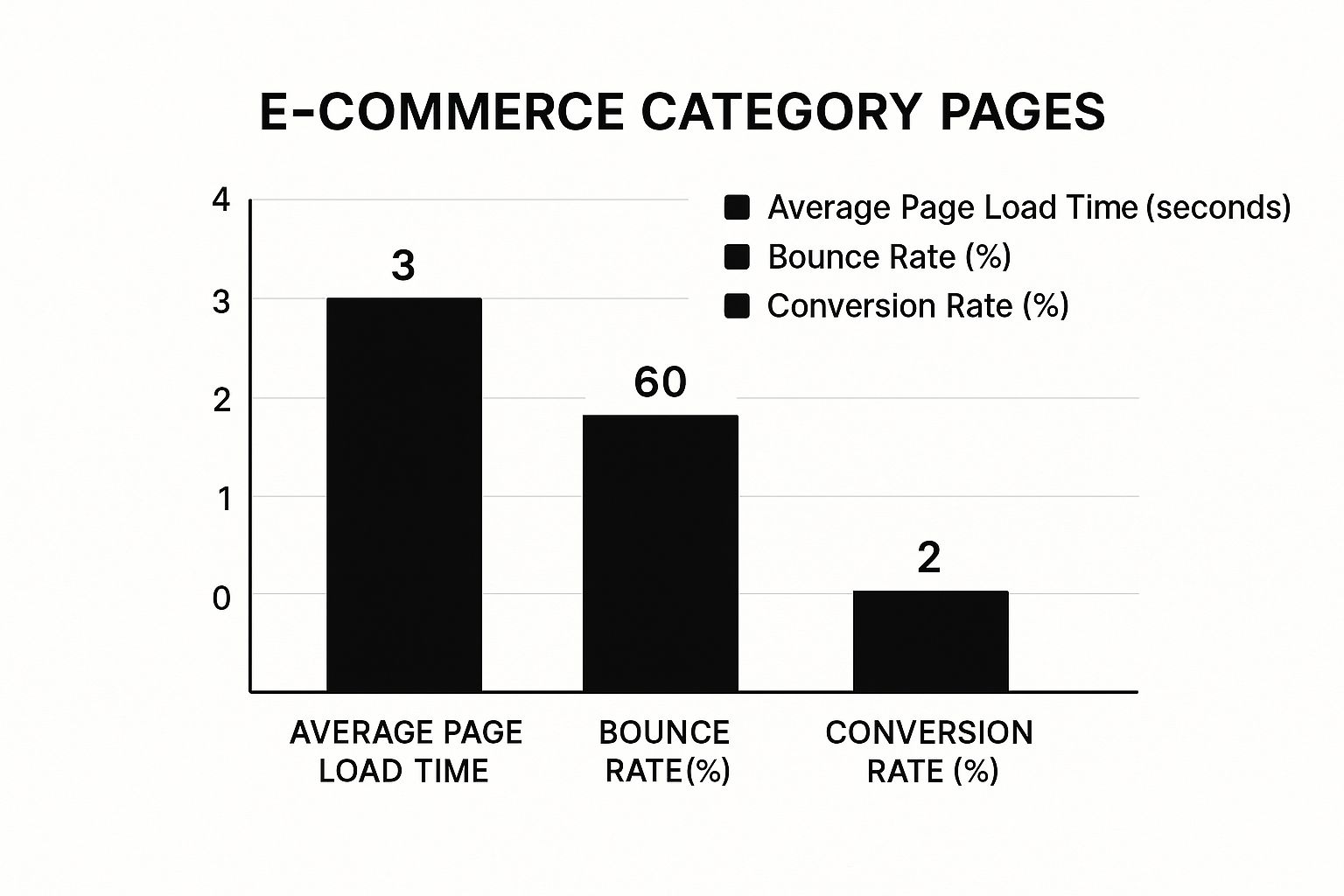
As you can see, as the page load time creeps up, bounce rates shoot up and conversion rates plummet. That really drives home the financial importance of a speedy site.
Think of your site’s architecture as the floor plan of a department store. A good one guides shoppers logically from the entrance (homepage) to different departments (category pages) and finally to the specific items they want (product pages). When I first look at an e-commerce site, one of the first things I check for is a clear, hierarchical structure.
A simple and effective structure usually looks something like this:
This creates logical breadcrumb trails (like Home > Men's Clothing > T-Shirts) that help both users and search engines understand where they are on your site at all times. A clean URL that reflects this logic, like yourstore.com/mens-clothing/t-shirts, is also much better for SEO than a messy, parameter-filled URL.
Site speed isn’t a minor ranking factor anymore; it’s a massive part of the user experience and a cornerstone of modern e-commerce SEO. E-commerce SEO in the UK has shifted to focus heavily on Google’s Core Web Vitals, which are specific metrics that measure the real-world experience of using your site.
When a page takes longer than three seconds to load, over half of your potential customers will simply leave. That's a huge amount of lost revenue caused by something that is entirely fixable.
Because Core Web Vitals are so important, it’s worth understanding what they are and what you should be aiming for.
| Core Web Vitals Explained | ||
|---|---|---|
| Metric | What It Measures | Good Score Target |
| Largest Contentful Paint (LCP) | How long it takes for the main content (usually an image or block of text) to load on the screen. | Under 2.5 seconds |
| Interaction to Next Paint (INP) | How quickly your page responds to user interactions, like clicking a button or a menu. | Under 200 milliseconds |
| Cumulative Layout Shift (CLS) | How much the page layout moves around unexpectedly as it loads. It's a measure of visual stability. | Less than 0.1 |
Meeting these targets ensures your site feels fast and responsive, which Google loves. With around 27% of global users now using voice search, having a fast, mobile-friendly site optimised for these vitals is also crucial for capturing those natural language queries.
Here are my go-to actions for improving site speed:
Finally, let’s talk about making your products stand out right there in the search results. Schema markup is a type of code you add to your website to help search engines understand your content in more detail. For an e-commerce store, this is incredibly powerful.
By adding product schema, you can tell Google specific details like:
In return, Google can display this information as rich snippets directly in the search results. You've definitely seen them – the star ratings, prices, and 'in stock' labels you see under a product listing.
These eye-catching snippets make your listings far more appealing. They can significantly boost your click-through rate and give you a real advantage over competitors who haven't bothered to implement it. Most modern platforms like Shopify handle this automatically, but it's always worth double-checking that it's working as it should.
Good e-commerce SEO doesn't just stop at your website. It’s about building a solid reputation across the whole internet. Think of it like this: Google wants to send its users to the most trustworthy and genuinely helpful online stores. My job is to prove that your store is one of them.
To build this kind of digital street cred, I focus on two things that work together perfectly: smart content marketing and ethical link building. Get these right, and you're sending a massive signal to search engines that your brand is a leader in its field and deserves to be at the top.
Honestly, the best way to get powerful backlinks is to create content that other websites actually want to link to. This is why a proper content marketing strategy is so crucial for any e-commerce site. It’s about offering real value, not just pushing products.
I'm not talking about churning out generic blog posts for the sake of it. I mean creating genuinely useful, deep-dive resources that solve a real problem for your customers. For example, if I was working with a shop selling high-end kitchenware, I wouldn't just write about new frying pans.
Instead, I'd create something like 'The Ultimate Guide to Cast Iron Care'. This is what we call a linkable asset. It's designed from the ground up to attract links naturally because it's simply the best resource out there on that specific topic. It also helps the store rank for informational searches, catching potential customers much earlier in their buying journey.
Here are a few types of content that are brilliant for attracting quality links:
Creating fantastic content is the first step, but sometimes you need to give it a nudge to get the ball rolling. This is where I bring in proactive, ethical link building. It's less about trying to trick Google and more about building real relationships. A quality backlink is like a trusted recommendation from another site—and that's worth far more than a random ad.
My link-building strategies are always about quality and relevance. The goal is simple: get your store mentioned on websites that your ideal customers already read and trust. A single link from a respected industry blog is worth a hundred links from spammy, irrelevant sites.
A key principle of modern link building is that it's about earning a vote of confidence. If a lot of other trusted sites link to your content, Google sees that as a strong signal of your credibility and authority.
To get these valuable links, I use a few different tactics:
By mixing great, link-worthy content with smart, relationship-based outreach, I build a strong and healthy backlink profile for your store. This doesn't just improve your e-commerce SEO; it establishes your brand as an authority people can trust, driving both traffic and sales. If you want to dive deeper, you can explore the various types of SEO strategies and tools that are out there.
Knowing the theory is one thing, but getting results from e-commerce SEO comes down to consistent, focused action. I've been in the trenches with this stuff for years, and the biggest win is turning all these strategies into a repeatable process. To help you get organised, I’ve put together a practical action plan.
Think of it as your roadmap. The secret is to break the work down into simple daily, weekly, and monthly tasks. This approach stops you from feeling swamped and makes sure every part of your SEO gets the attention it deserves over time.
These are quick, five-minute jobs that are absolutely vital for keeping your online store healthy. Don't skip them.
Block out an hour or two each week to go a bit deeper. This is where you’ll spot opportunities and keep the momentum going.
SEO isn’t a one-off project; it’s a continuous cycle of doing, measuring, and refining. Consistency is far more powerful than occasional bursts of intense effort.
Once a month, it's time to zoom out, look at the big picture, and plan your next big moves.
As someone who works in e-commerce SEO every day, I get asked the same questions time and again by store owners just finding their feet. So, I’ve put together some straightforward answers to the most common queries to help you get started with a bit more confidence.
This is the big one, and the honest answer is: you need to be patient. You might see some small wins from your on-page tweaks within a few weeks, but for the big stuff—like hitting the first page for your most important keywords—you're typically looking at 4 to 12 months.
Of course, this all depends on how tough your market is, the state of your website right now, and how much effort you consistently put in.
I always tell people that SEO is like planting a tree. You have to nurture it and give it regular attention before it starts bearing fruit. But once it does, the results are sustainable, unlike the quick-fix rush you get from paid ads.
Most of the big e-commerce platforms like Shopify, BigCommerce, and WooCommerce are already well-equipped for SEO right out of the box. The "best" platform isn't really about one being technically superior for SEO; it's about finding the one that fits your business and how comfortable you are with the tech side of things.
At the end of the day, the core SEO principles I've talked about—keywords, content, site health, and backlinks—are the same no matter which platform you choose.
You can absolutely get started on your own, especially if you're a small business. By following the advice in this guide, you can handle the fundamentals like keyword research, on-page optimisation, and creating good content yourself.
Once your business starts to grow, or if you're in a really competitive market, bringing in a specialist freelancer or an agency can be a real game-changer. They have the deep expertise, professional tools, and dedicated time to seriously speed up your results. This frees you up to focus on running the rest of your business.
At Mersudin Forbes Digital, I provide the insights and tool recommendations needed to master your SEO and improve your digital performance. Discover the strategies that can help you grow.


